
IMPORTRANGE making Google Sheets™ slow? Import once, reference many
IMPORTRANGE is the easiest way to pull data from another Google Sheets™ file, and the easiest way to slow yours down. Each call fetches across files on its own schedule, and a sheet scattered with dozens of them spends its life waiting on fetches.
Why it hurts
- Volume. Ten imports cost roughly ten times one import. Fifty small imports across a dashboard add up fast.
- Chains. If file A imports from B and B imports from C, an edit in C ripples through two fetches before A settles.
- Whole-range imports. Importing entire columns "to be safe" fetches far more than the sheet uses.
The import-once pattern
- Make one raw data tab per source file.
- Put a single
IMPORTRANGEat the top, with the narrowest range that covers the data. - Point every formula, lookup and chart in the workbook at the raw tab, never at another
IMPORTRANGE. - If a chain exists (A ← B ← C), see whether A can import from C directly.
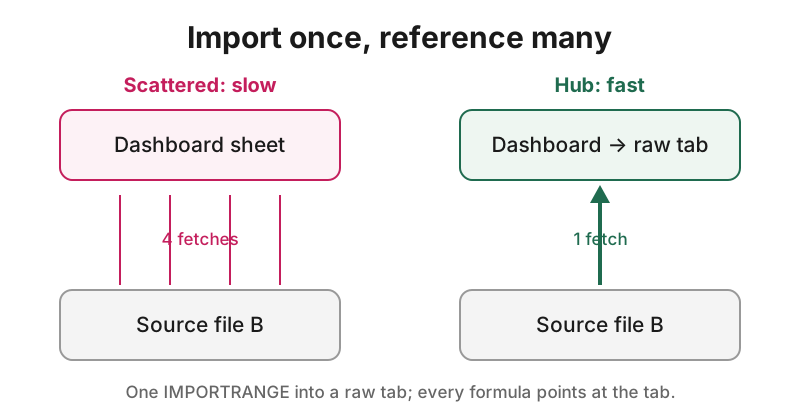
The sheet then waits on one fetch per source instead of dozens, and there is exactly one place to look when the data looks stale.
Find every slow import
Sheet Speed Checker™ grades a Google Sheets™ file and shows where the time goes, including every IMPORTRANGE and what it costs. Checking the active sheet, the grade, every finding and Undo are free.
Install from the Google Workspace Marketplace™
Google, Google Sheets™ and Google Workspace™ are trademarks of Google LLC. App Garden™ is not affiliated with or endorsed by Google.
Google, Google Sheets™ and Google Workspace™ are trademarks of Google LLC. Sheet Speed Checker is not affiliated with or endorsed by Google.